FlowCLI
A fast, minimal CLI project task manager for efficient task and project management
Yang Zhenzhao - Project Portfolio Page
Overview
FlowCLI is a CLI application for managing tasks and projects with keyboard-driven workflows. It supports inline commands and interactive mode for users. Users can track priorities, deadlines and statuses, filter and sort instantly, then export to TXT files.
I designed and implemented the core command processing infrastructure, project/task management systems, data persistence, and status display features.
Summary of Contributions
Code Contributed
Enhancements Implemented
1. Command Processing Infrastructure
Designed and implemented the core framework using Command pattern for parsing and executing user commands. Built CommandHandler, CommandParser, and ArgumentParser to enable clean separation of concerns and support both inline and interactive modes. This extensible architecture allows easy addition of new commands.
2. Core Data Models (Project and Task Management)
Implemented fundamental classes (Project, ProjectList, Task, TaskList) forming the data management backbone with encapsulation, validation, and comprehensive exception handling.
3. Status Display System
Built visual progress tracking with completion percentages, ASCII progress bars, and context-aware motivational messages. Uses ProjectStatusAnalyzer following single-responsibility principles.
4. Data Persistence System
Implemented automatic save/load with atomic write operations (temp file + rename), data validation, special character escaping, corruption detection with backup, and retry logic. Handles edge cases: first-time runs, empty data, corrupted files, filesystem errors.
5. Exception Handling & Application Lifecycle
Created custom exception classes for meaningful error messages and implemented main application class coordinating all components.
Contributions to the User Guide
Data Persistence section • Common Workflows section • Troubleshooting section • Tips and Best Practices section • Export file format example
Contributions to the Developer Guide
Command Processing Infrastructure (architecture + sequence diagram) • Status Display System (class diagram + execution flow) • Common Classes section • Data Storage (implementation details + class diagram + data format)
Contributions to Team-Based Tasks
Set up project architecture and package structure • Designed command processing infrastructure for team use • Established code review standards • Configured GitHub Pages with _config.yml • Added documentation branding (cover images, logo)
Review/Mentoring Contributions
Established foundational architecture and coding patterns as reference implementation for the team.
Contributions Beyond the Project Team
Bug reports submitted during PE-D
Contributions to the Developer Guide (Extracts)
Command Processing Infrastructure
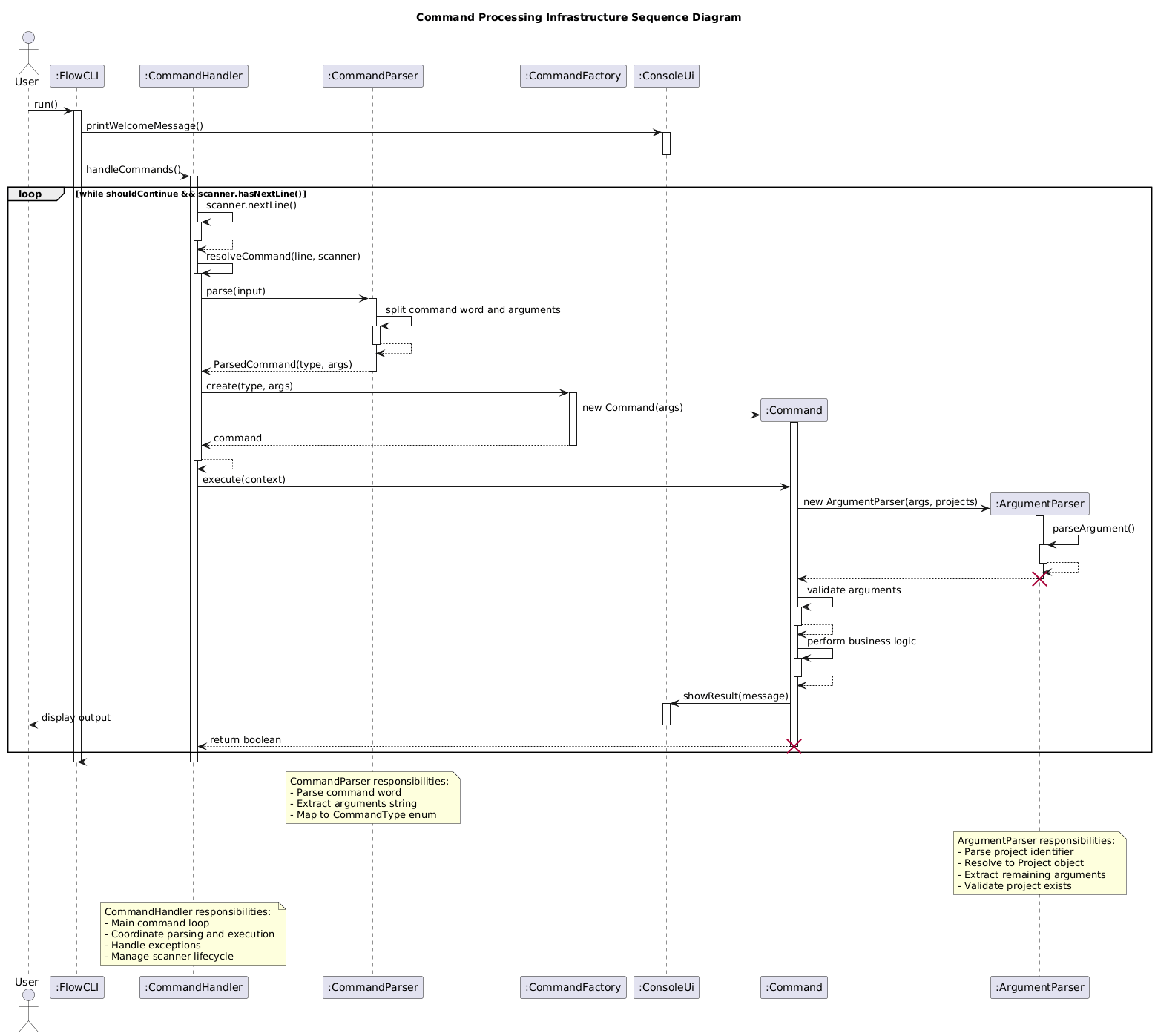
The command processing infrastructure forms the backbone of FlowCLI’s architecture, enabling efficient parsing and execution of user commands. This system consists of three main components:
Architecture Overview:
- CommandHandler: Coordinates the command execution loop, managing the application’s main control flow
- CommandParser: Analyzes user input and creates appropriate Command objects based on the input string
- ArgumentParser: Provides utility methods for extracting flags and arguments from command strings
Design Rationale:
The infrastructure follows the Command pattern, where each command encapsulates its own execution logic. This design:
- Enables easy addition of new commands without modifying existing code (Open-Closed Principle)
- Separates command parsing from execution (Single Responsibility Principle)
- Makes commands independently testable
- Supports both inline and interactive command modes through a unified interface
Sequence Diagram:
The following sequence diagram illustrates how a user command flows through the system:
Implementation Details:
The ArgumentParser class provides flag-based argument extraction, which all commands leverage for consistent input handling:
public static String getArgumentForFlag(String input, String flag)
        throws MissingArgumentException {
    // Extract argument following the specified flag
    // Throws exception if flag is present but argument is missing
}
Status Display System
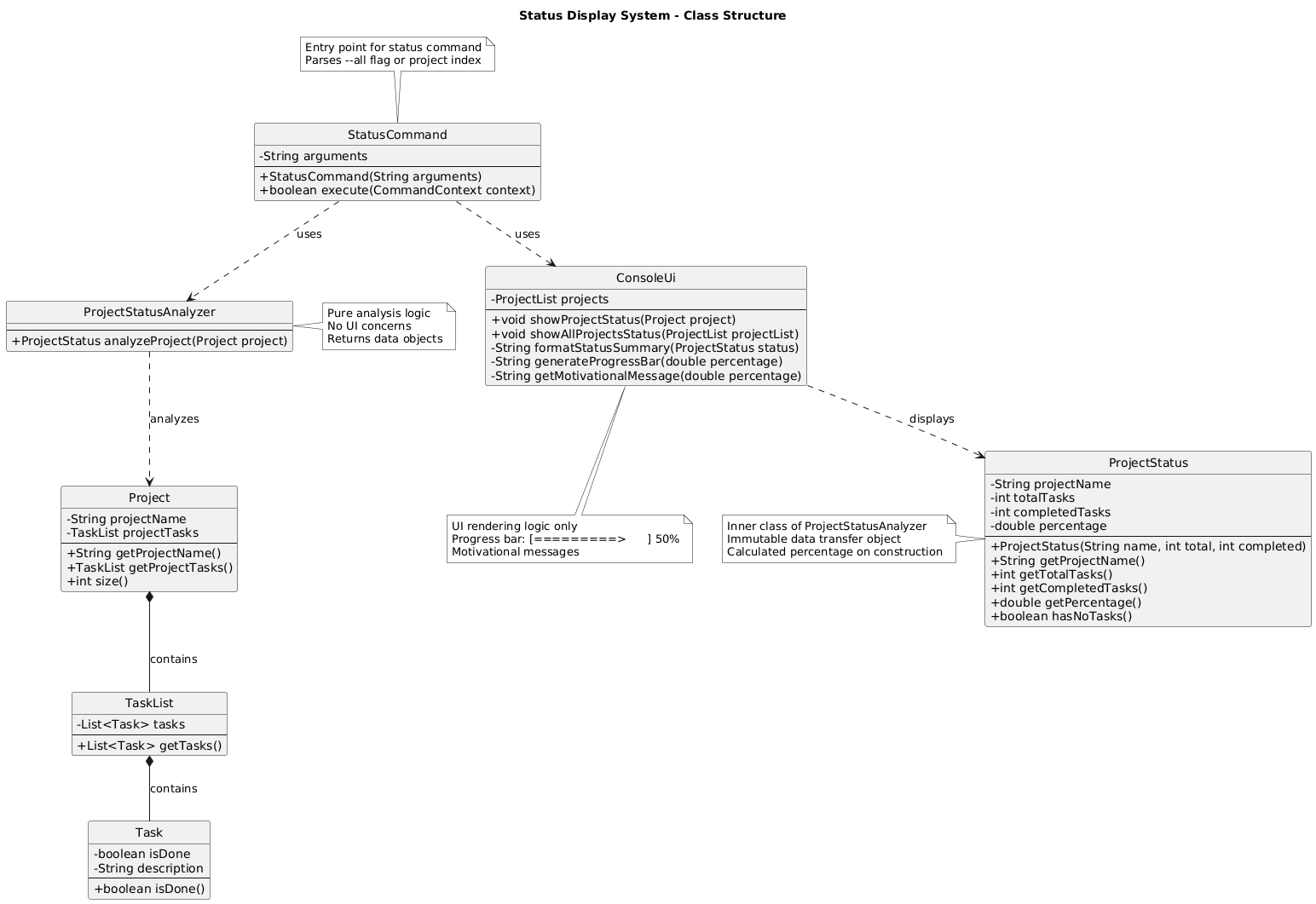
The status display system provides users with comprehensive project progress tracking, featuring completion percentages, visual progress bars, and context-aware motivational messages.
Architecture Overview:
The system separates concerns through two main components:
- StatusCommand: Handles user interaction and command routing
- ProjectStatusAnalyzer: Performs progress calculation and generates status data
Class Diagram:
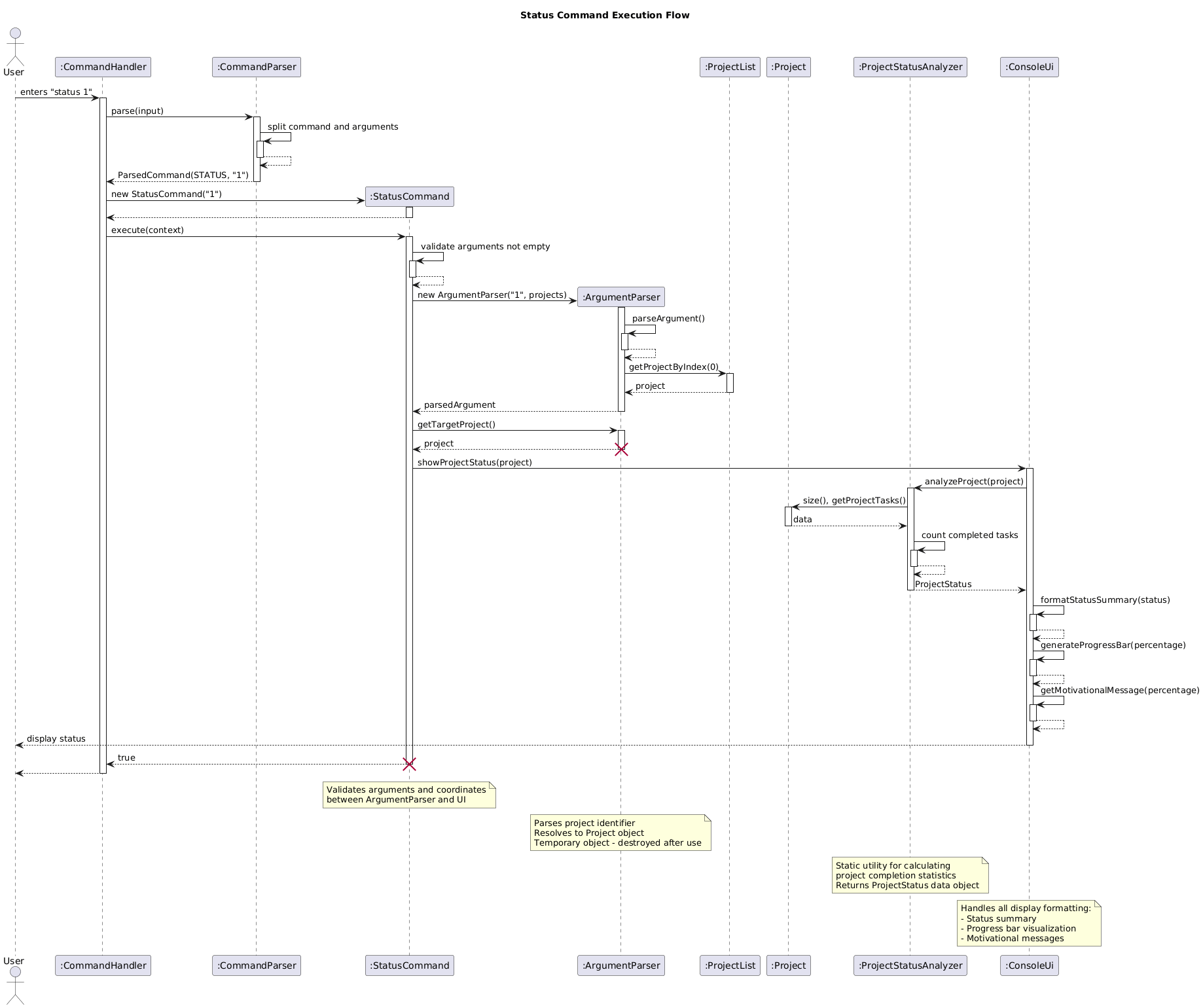
Execution Flow:
When a user executes status <projectIndex> or status --all, the following sequence occurs:
Implementation Details:
The ProjectStatusAnalyzer calculates completion metrics:
public static ProjectStatus analyzeProject(Project project) {
    int totalTasks = project.size();
    int completedTasks = 0;

    for (Task task : project.getProjectTasks().getTasks()) {
        if (task.isDone()) {
            completedTasks++;
        }
    }

    int percentage = (totalTasks == 0) ? 0 : (completedTasks * 100) / totalTasks;
    return new ProjectStatus(totalTasks, completedTasks, percentage);
}
Display Features:
- Progress Bar: Visual representation using ASCII characters (
[=====> ]format with percentage) - Completion Percentage: Numerical progress indicator
- Motivational Messages: Context-aware messages based on completion level:
- ≤25%: “You are kinda cooked, start doing your tasks!”
- ≤50%: “You gotta lock in and finish all tasks!”
- ≤75%: “We are on the right track, keep completing your tasks!”
-
75%: “We are finishing all tasks!! Upzzz!”
Data Storage
The storage system provides persistent data storage for FlowCLI, automatically saving and loading all projects and tasks between sessions.
Architecture Overview:
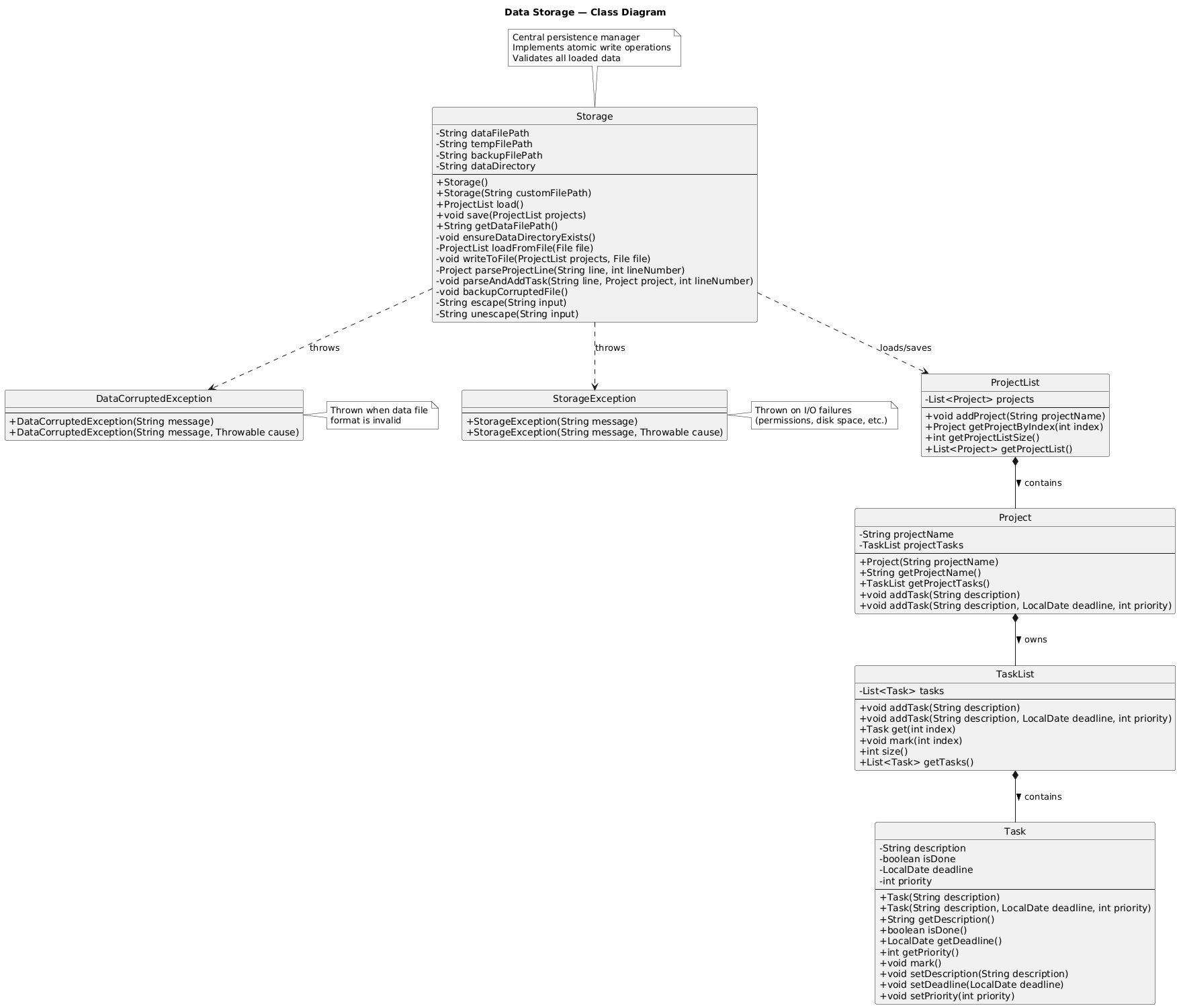
Key Components:
- Storage: Main class handling file I/O, validation, and atomic write operations
- DataCorruptedException: Thrown when data file format is invalid
- StorageException: Thrown on I/O failures (permissions, disk space, etc.)
Storage Location: ./data/flowcli-data.txt
Data Format:
PROJECT|Project Name
TASK|isDone|description|deadline|priority
Implementation Highlights:
- Atomic Writes: Data is written to a temp file first, then renamed atomically to prevent corruption
- Data Validation: All loaded data is validated; corrupted files are backed up and user warned
- Error Handling: Retry logic for save failures; graceful degradation on load errors
- Edge Cases Handled: First-time runs, empty data, corrupted files, filesystem errors
Common Classes
The common classes form FlowCLI’s core data model, providing robust project and task management capabilities.
Class Diagram:
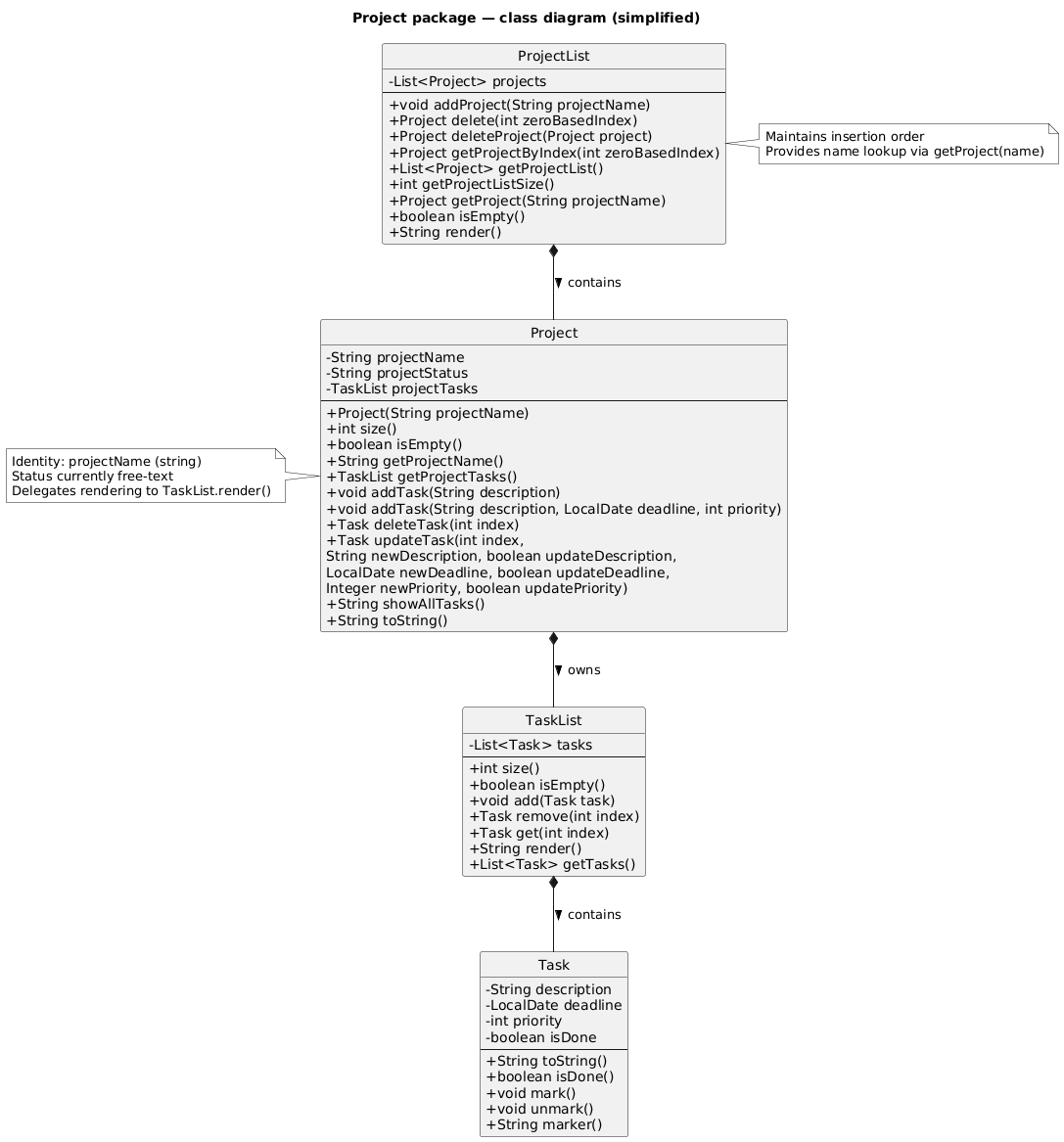
Class Overview:
- Project: Represents a project containing multiple tasks, with methods for task CRUD operations
- ProjectList: Manages the collection of all projects with validation and search capabilities
- Task: Represents an individual task with description, priority, deadline, and completion status
- TaskList: Manages collections of tasks with validation and index-based access
Class Relationships:
- ProjectList contains multiple Project instances
- Each Project contains a TaskList
- Each TaskList contains multiple Task instances
Design Principles:
These classes follow object-oriented design principles:
- Encapsulation: Internal state is private with controlled access through methods
- Validation: All operations include input validation with meaningful exceptions
- Immutability where appropriate: Certain fields are final to prevent unintended modifications
Contributions to the User Guide (Extracts)
Common Workflows
Here are practical examples of how to combine commands for common use cases:
Daily Task Review
# Check what's urgent
filter-tasks --priority high
status --all

# Review and update a task
list 1
update-task 1 2 --deadline 2025-11-15
mark 1 1
Weekly Planning
# See all upcoming deadlines
sort-tasks --deadline ascending

# Export high-priority items for the week
export-tasks weekly-plan.txt filter-tasks --priority high sort-tasks --deadline ascending
Project Cleanup
# Check project status
status --all

# Mark completed tasks
mark 1 1
mark 1 3

# Remove finished tasks
delete-task 1 1
Tips and Best Practices
Workflow Optimization
- Start each session fresh: Use
list --allto check what projects you have - Use descriptive project names: Makes filtering and organizing easier later
- Set realistic deadlines: Helps with priority management and sorting
- Data automatically persists: Your work is saved automatically when you exit with
bye
Task Management
- Mark tasks as done regularly: Helps track progress with the
statuscommand - Use priority levels strategically: High for urgent tasks, medium for regular tasks, low for nice-to-have items
- Set deadlines wisely: Even if approximate, deadlines help with sorting and planning
Export Strategies
- Exports for sharing: Export creates human-readable files perfect for sharing with team members
- Filtered exports: Create focused task lists for specific needs (e.g., high-priority items)
- Data transfer: Copy
data/flowcli-data.txtto move all data to another machine